David Mouri
Cycle 1
AR Focus Statement
Functional Life Skills are part of life that many of us learn and take for granted. How often do you pay attention to the steps to do a load of laundry, or the equipment needed and the steps it takes to wash dishes correctly? When you are a student with special needs learning those everyday life skills can be a challenge. As a teacher how do I make that process easier? The Action Research process will guide the path I take using Web 2.0 tools to engage my students as we explore everyday functional life skills and academic curriculum. The challenge to teach functional life skills, and academic curriculum while fully engaging students will be addressed through this research project.
Targeted Audience Details
The target audience is the students of the Life Skills special education program at Freeport High, in Freeport, IL. The learners are students with a variety of mental and physical disabilities, presented as Autism, Fragile X Syndrome, Downs Syndrome, Cognitive Disabilities, Tourette’s syndrome, and Learning Disabilities. IQ’s range from 45 to 70′s, with academic levels covering pre-primer to 4th grade. Learners are 14 through 21 years of age. The demographics of my class is as follows: 7 girls, 12 boys, 14 white, 4 African-Americans, 1 Bi-racial. 10 are from 2 parent homes, 7 are from single parent homes. Average median age is 17.7 years old. 2 students are 5th year returning students. 4 seniors, 2 juniors, 3 sophomores.
Summary of Cycle 1
- I introduced a lesson on descriptive adjectives with my interactive whiteboard. I also created a Google worksheet that went along with the lesson. My students have a difficult time expressing themselves about each other and especially about themselves. This lesson was to help them through that type of skill. My students have never been exposed to Google Documents before, so I used a Screenflow video to teach them how to use the Google worksheet. Students were offered a limited amount of choices, and limited typing requirements to complete the worksheet. It was unclear in the beginning how my students would react to using the Google document and using a descriptive adjective correctly. As the lesson went into its second day it became clear that students understood how to use descriptive adjectives appropriately about their partner and themselves. The lesson also proved that with help from the instructor, and a worksheet that has limited choices, and typing requirements, students were able to use a Google Document. As a result I began to plan out what other Web 2.0 tools I was going to use and what subject areas and functional life skills to use them with. Word It Out, Popplet, Prezi, Comic Life, and VoiceThreads, were the ones I was going to use. The class is using Penzu (www.penzu.com) for their daily journal entries. I realized that by using these different tools it creates a toolkit to present a life skill that is broken down into steps. The cognitive levels of my students require even the simplest skill to be broken down into steps. For instance a load of laundry depending on a persons personal habits could have as many as 10 steps. Students will reinforce the steps by entering them into these different programs, as visual cues, and printed visual reminders about the steps of a particular functional life skill. Students can collaborate while using these programs and comment on each others work while they learn about the steps of a life skill.
- I was happy to see that my students picked up on the lesson on descriptive adjectives, and as we moved on to the surveys I found out that there were some issues with student the worksheet but I was able to work it out. So my students were doing well, but I was finding it hard to get the cycle going inside of our curriculum. It would be nice to say I have a set curriculum but I don’t. The fact is we have no curriculum and myself and my co-teacher are always creating it on the fly. We do have set material we cover, but often we have to make many adaptations.
- Students have found Web 2.0 tools fun but at the same time difficult. The cognitive levels of some of my students made using these tools difficult, but with help they were able to participate fully. I plan to follow up with a survey on each of the Web 2.0 tools we have used and will include results in the data.
- Did you make any adjustments to the timeline from your plan of action? Students made adjustments to the how they went about finding the necessary information for the assignments given.Voice Threads was difficult to talk through, it caused some anxiety issues. These issues lead to students wanting an extra week to complete the research being done on a state, or reptile.
- I ran into difficulties with the school districts Internet filter. I was put behind because the technology department kept telling me that they were working on issues with Tagxedo and would have it fixed. I waited as they tried, but in the end I was told to consider the Web 2.0 Tool Tagxedo to off limits until further notice.
- My students proved that I could move onto a similar Web 2.0 tool – Word It Out and use that to record the information they had found. Students found Word It Out to be pretty simple.
- “I thought Popplet was a lot fun, and easy to use. Says the student pictured below.
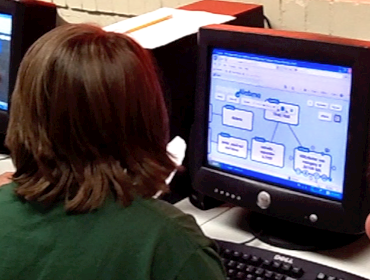
Students Using Popplet
I found out that the worksheet I made needed to be redone so that my students could enter their data.
I also chose to use Comic Life for my social studies geography lesson. The students picked up Comic Life quickly, and used it to display their facts about 2 states of their choice. My students were fully engaged with Comic Life and did a great job displaying their state facts. I have some pictures of my students using Comic Life, but have had an issue getting them off of my camera.
I decided to introduce my class to VoiceThreads to use with science presentations reptiles. Teaching my students to run this program proved to be difficult. I realized that their computer skills in certain areas were really good, but those areas had nothing to do with how VoiceThreads runs. Some of my students had a hard time logging in, only because their disability made it hard. Others were in and using the program like they had used it for a long time. The good thing that came out of this experience was that I discovered the limitations of two of my students, and It pushed me to research how I could change that. I discovered a program called WordQ, a program that will allow students to dictate what they need to say. I will be requisitioning that program for next fall.
http://voicethread.com/book.swf?b=2697687
I produced a song and video to go over the steps to do a load of laundry. Titled Laundry Laundry 123 my students had a lot of fun watching the video and learning the song. This song proved to be a very functional life skills and a great tool to teach the skill.
Data
Reporting the data –
The data from the descriptive adjective lesson was gathered by using a Google worksheet. Students used words about themselves (personalities), about their physical appearance, words they like, disliked , were true or false about them. Students entered this data into a Google worksheet. Students also made Word It Out word cloud posters
Here is the worksheet:
https://docs.google.com/spreadsheet/viewform?formkey=dGVJWk9Yb0pOQWZWN3RobTlFNkEtMlE6MQ#gid=0
Other Web 2.0 Tools were used in social studies and science. In social studies students had to present factual information about a state of their choice. The facts were then put into VoiceTreads http://voicethread.com/share/2759806/
Science – Students were to research a reptile and present the facts about that reptile using pictures and comments – http://voicethread.com/share/2697687/
I used a Google Doc Survey to see how my students felt about using VoiceThreads with a science assignment –
Formative data was taken in the form of the Web 2.0 tools that were used for class.
Word It Out – used for descriptive adjective lesson.
Here is an example of a descriptive adjective Word Cloud:

Descriptive Adjectives Word Cloud
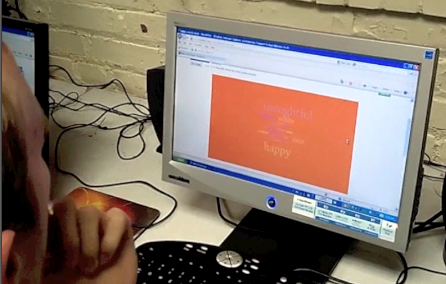
Students using Word It Out
Popplet – used for social studies lesson on the 50 states.
Comic Life – used for mammal science unit.
VoiceTread – used for social studies favorite state assignment.
Students used these Web 2.0 tools as they worked on specific lessons in science and social studies. Students had a lot of fun and despite their disabilities.
I had the students present their facts in front of the class and online via VoiceThreads. My student’s cognitive abilities limit them severely so the amount of information expected of them was also limited. I wanted them to find three facts about their state or mammal. Students worked on the state assignments with a partner, and individually on mammals.
I made three videos, one on using Popplet, Word Cloud and Prezi as a way of keeping record of what I had presented to the class.These videos showed the students abilities to work independently or with another peer as they used a Web 2.0 tool.
The class did a Descriptive adjectives lesson that utilized “Word Cloud”, and a Google doc worksheet. This lesson taught my students how to describe themselves and describe a partner.
Here is a sampling of the words students came up with.
What words describe personality?
Very nice girl, quiet, but has had some mental health issue. Nice sweet kind gentle happy funny young loyal kind pretty loving nice neat caring tall skinny
What Words describe Physical Appearance?
Very shy young man who has come out of his shell more over the past two years. White tall skinny white shoes blue eyes nice teeth helpful thoughtful
What words do you like? List the ones you like
Nice, sweet, kind, white, tall, skinny, blond hair, gentle, white shoes, blue eyes, nice teeth.
What words do you Dislike?
Ugly, nasty, call people names, I hate
Which words are True?
Tall, nice, sweet, tall nice, friendly, kind
Which words are False?
Loud
The class completed the descriptive adjective worksheet and the data showed that the class still needs more instruction. Sixteen percent of the students used words describing the personality of another student incorrectly. Fifty percent of the words used to describe physical appearance were used incorrectly. One hundred percent of the class used words for personal information incorrectly.
Insight
I am glad that I chose to use some Web 2.0 tools with my students. The tools gave them another tool to present their work with. Written answers, and worksheets are hard for them so these tools allowed them to do research and provide the information forward using a different medium.My students using these tools have become more engaged, which supports the research. The Multiple Intelligences theory by Gardner gave the teacher ways to present material to students utilizing the differed areas of intelligence.These different Web 2.0 tools utilize those areas of multiple intelligence.I am preparing a series of short surveys that will ask students how they like or dislike using a Web 2.0 Tool.
https://docs.google.com/spreadsheet/ccc?key=0Ao8nYlEcMhhFdHN0dGtGdHNHSDdWeEhSaXhSWWVlakE&pli=1#gid=0
It is clear that if an educator can offer learning experiences that tap into the students different learning styles, abilities, interests, while using multiple approaches, no matter what the cognitive level of a student, leads to a student that is engaged in the learning process. I have seen this take place while using these Web 2.0 tools.
Surprises
Cycle 1 has had its up and downs. Week one and two in December I encountered a lot of trouble with the school districts Internet security filter. I found myself having an email battle with our technology department over the use of the Web 2.0 tools Tagxedo; the tech department said they were having a problem with the filter and despite many hours of work considers Tagxedo to be blocked until further notice. It was frustrating and very disappointing. I chose Tagxedo to go with a lesson about descriptive adjectives. I had to find another Web 2.0 tool to use in its place. I chose Word It Out, a word cloud Web 2.0 tool. This site came up unblocked, so my students were able to produce a world cloud of the descriptive adjectives they came up about themselves and their partner. The class did well and really enjoyed using Word It Out. I moved on to Popplet for my social studies class, as we studied the states. We used Popplet to present the information they found on two states of their choice. Students really enjoyed Popplet.
Computer skills were a big surprise to me. It is clear that my students can play games on a computer, but that does not mean they can us other programs. Logging in for some students was a challenge, and for others it was typing their information in the appropriate place in a program. The verbal presentations in front of the class went well, and I was happy to see that. That gave me an indication that when it came time to use VoiceThreads my students would be able to add voice comments with some help.
Next Steps
I want to go through the comments made on each VoiceThread and provide some tips on how to improve on them. Once they have the corrections made I want them to comment on each others. Learning how to collaborate is an important skill for my students.
The next step will be incorporating life skills into cycle 2. We will start with a lesson on the steps to wash dishes. The can do it in Comic Life, Popplet, Prezi, or VoiceThreads.
Evaluate and Reflect
Due to inconsistent parent participation, I made adjustments to my plan of action cycle. Lack of participation with the online survey and notes sent home that were not returned made it impossible to get a clear picture of computer skills and transition subject matter that parents knew and felt comfortable with. I had to switch my focus and concentrate more on the engagement of my students as they learned functional life skills at school, utilizing different Web 2.0 tools. I will continue this plan of action into cycle 2.
My students have been great and have been willing to try new programs to use on the computer. They have used the computer more now than ever before. After dealing with the district’s Internet filter, I am happy with our results so far. I will continue to try to use Web 2.0 tools with my students. That will mean more paperwork to present to technology department proving why I want to use a particular Web 2.0 tool.
 David Mouri
Comments are closed.