David Mouri
Action Research Focus Statement: Functional Life Skills are part of life that many of us learn and take for granted. How often do you pay attention to the steps to do a load of laundry, or the equipment needed and the steps it takes to wash dishes correctly? When you are a student with special needs learning those everyday life skills can be a challenge. As a teacher how do I make that process easier? The Action Research process will guide the path I take using Web 2.0 tools to engage my students as we explore everyday functional life skills and academic curriculum. The challenge to teach functional life skills, and academic curriculum while fully engaging students will be addressed through this research project.
Target Audience: The target audience is the students of the Life Skills special education program at Freeport High, in Freeport, IL. The learners are students with a variety of mental and physical disabilities, presented as Autism, Fragile X Syndrome, Downs Syndrome, Cognitive Disabilities, Tourette’s syndrome, and Learning Disabilities. IQ’s range from 45 to 70′s, with academic levels covering pre-primer to 4th grade. Learners are 14 through 21 years of age. The demographics of my class is as follows: 7 girls, 12 boys, 14 white, 4 African-Americans, 1 Bi-racial. 10 are from 2 parent homes, 7 are from single parent homes. Average median age is 17.7 years old. 2 students are 5th year returning students. 4 seniors, 2 juniors, 3 sophomores.
Summary of Cycle 2
- Cycle 2 started out in one direction and ended up turning another. It is clear that even the best laid out plans do not always work out the way you wish them to. Cycle 2 was originally to be centered on working with my parents of my students, concerning their understanding of the procedures and laws surrounding the transition process from student to adult with a disability. During cycle 1, I attempted to get some basic computer information from the parents, and found that to be difficult. It turned out that those parents that had the means to have a computer available were those of middle-income or better and are invested fully in their child’s education. It was difficult to get the other parents to participate, so I realized that it was the same way with IEP meetings every year. There was a pattern in place and I finally realized it.
- This lead to a change in plans and I had to rethink cycle 2. Functional life skills are important to my students of special needs. Learning to be more independent even while living at home will only make the quality of life for each student and family easier. Cycle 2 covered the use of Web 2.0 tools in the classroom. I used Popplet and Voice Threads to teach the functional life skills: 1. Doing a load of Laundry, 2. Making a grilled cheese sandwich.
- I chose to use five different Web 2.0 tools to use in three different class periods. The goal was to teach the students how to use them so later on we could use them when working with a specific life skill. The tools I chose to use were: Popplet, Voice Threads, Comic Life, Word It Out, and Penzu. Penzu is used as a daily journal.
- The functional life skills to be taught were doing a load of laundry, and cooking their own grilled cheese sandwich.To develop my students skills in using a Web 2.0 tool I chose to have them create a social studies and science lesson using Comic Life as a first step. The second step was to use Popplet with the science class as another tool to present information they had been researching. The third development step was to use Voice Threads to present their information in both the social studies class and science. To implement this process I knew it was going to take time. Time to teach the class the programs, and time for them to get used to using it. Time to allow for research and presentation.
- I have eight computers available in the room, so I had to take that into consideration. I was also able to use in the whiteboard computer as a workstation. The students used Word 2.0 tools to present the following activities: reptiles, mammal’s, state facts, 10 year life plan, steps to make a grilled cheese sandwich and steps to do a load of laundry. The students were to find basic facts about a reptile, mammal, and State facts and make a presentation in a Comic Life cartoon.
The next step was to present popplet to the class. Popplet was used in social studies class as the students made a popplet with state facts used from Comic Life. Each student had looked up the following state facts:
Name of State, State Capitol, Statehood Date, state flag, state, flower, state bird, and tourist attraction,
Lastly students learned how to use the Web 2.0 Tool Voice Threads, which allowed students to post their facts and add typed and voice comments to what they posted. Classmates will be allowed later to add comments to the presentation. I also used Penzu to journal everyday.
- Throughout this process, I have been amazed that my students have answered the question – Can students with special needs, and IQ’s ranging from 40 to 65 able to use Web 2.0 tools to present information that they have researched and gathered. The second question is will they find these tools to be engaging and fun. I came up with some Google Doc surveys to find out what my students thought about the Web 2.0 tools.
- The outcome at the end of the process was that my students were able to learn how to use several Web 2.0 tools. In using those tools they were able to demonstrate that they could present material they had researched. I observed that each of the students was engaged in the process, and despite the hard work they had fun. In terms of high level thinking, my students demonstrated they be given a set of information to find, they went on the internet found the information and presented in the format of the Web 2.0 tool chosen for that activity. Worksheets are always difficult for my students, so this hands on learning with the computer as a tool and software that was hands on, has proved to be more engaging. I created some Google Doc Surveys to allow students to answer and respond to how they liked each of the Web 2.0 tools they have used in class. Here are the results:
Data Results:
- The responses show that 20% of the class thought that Comic Life was a lot of “fun”. Adding pictures, words, and making the comic showed 13% of the class liked each of those categories. Only 2% of the class thought it took to long to use the program. Thirty-three percent said they would NOT use the program again, but they do know that it will be the teachers choice to use it or not.
- The data shows that 11% of the class felt that Popplet was easy to use, 0% found it to be too complicated, 36% loved making the Popplet’s and adding pictures to them, and 21% liked adding video to each Popplet. Seventy-five percent of the class said they would use Popplet again. Overall, the class found Popplet the easiest tool to use so far, and I know it will be a tool we can continue to use. It kept my students fully engaged in their work.
- The Data shows that 29% of the students found Voice Threads hard to use, 7% found it easy to use, 14% thought it was “Fun”, 14% found it to “Neat” and “Good”. Thirty-six percent of the students like making comments, 21% liked talking to the program and looking at pictures. Seven percent found the program too “hard” to use, 3% worried about messing up the spoken words, and 50% said they would use the program again. That is encouraging to find out that at least half of the class wants to reuse it. Students where to present the name of State, State Capitol, Statehood Date, state flag, state, flower, state bird, and tourist attraction, in the Voice Threads
To evaluate the functional life skill of making a grilled cheese sandwich, I played a game with my entire class, to assess if they can make a grilled cheese sandwich. They participated in the First Annual Grilled Cheese Sandwich Relay Race.The class proved that they had learned the steps to make a grilled cheese sandwich. 90% of the students participated in the cook off, and during the game each team had minimal prompts from the staff. After the relay race students were able to make their own, and 95% of those students so with no help from staff. Parents evaluated my student’s abilities to do a load of laundry. They had to let them do a load laundry at home. Some parents felt their student can’t handle that life skill. No formal survey was done about doing the laundry at home.
The data suggests that my students have become fully engaged in an activity when using a Web 2.0 tool, and research shows that when students are challenged to use different levels of thinking and are presented with tools to bring those levels outward, students learn more according to Gardner. Different learning styles can be addressed in each of the tools I chose to use, therefore presenting multiple platforms for students to respond with and learn from.
I can conclude that using Web 2.0 tools to teach functional Life Skills is a great tool to use with students with special needs. The IQ of the students in every case influenced what could be accomplished while using a Web 2.0 tool. Their IQ did NOT keep them from using the tool, and IQ did not keep them from enjoying or dislike using a tool. Adaptations had to be made while using a tool, and proved to be helpful in every case. It is also clear that when material is presented in several Web 2.0 tools in different formats it helps the students to retain the information.
Surprises
I am amazed how my students caught on to the use of these different Web 2.0 tools. My students learn in many different ways and they took advantage of what was presented to them in each program. I also discovered that we need to work on some basic computer skills on a daily basis, logging in at times proved to be difficult. There are several students that could use other software programs such as WordQ or Dragon Naturally Speaking to help them guide the computer to type out what they want to say.
This cycle proved that students with special needs can use Web 2.0 tools and can learn the material presented in each program. Were my students engaged as they learned these programs, I believe so.
I will continue to use these tools as part of my class. There will be many more functional life skills to teach, and I will use these tools with short video presentations to my students. It has been a challenge but it has been a lot of fun too.
I played the game I created – The First Annual Grilled Cheese Relay Bake Off, and used that as a fun way to asses how much my students learned about making a grilled cheese sandwich. Voice Threads proved to be hard, but I think if I structure a lesson with shorter steps, I think my students can use that tool to its fullest. You can view the game below under the examples section.
I need to come up with a list of the functional Life Skills I wish to teach, and then structure them using the ADDIE process. Once that step is done I will decide on what technologies to use to teach those lessons. Using the LMS system Schoology will create an environment that will allow communication between school and home with those parents who have computer access. The homes without computer access will have to have material sent home in written form, when assignments are completed and printed out at school.
Evaluate and Reflect:
The main change I made was the amount of time that I had to spend teaching a Web 2.0 tool. My special needs students in some cases took a longer time to catch on to the programs being used.
Initially I wanted to include parents as participants.I had to drop the parent section of my action plan and solely focus on my students.
I will continue to use my students and I will use the Web 2.0 tools in the classroom and when teaching the functional life skills.
Examples:
I used a ScreenFlow presentation to introduce the class to the Program Popplet. They had not used a program like that before.
Here is a video clip showing my students using Popplet in the classroom setting.
Here is what a Penzu page looks like:
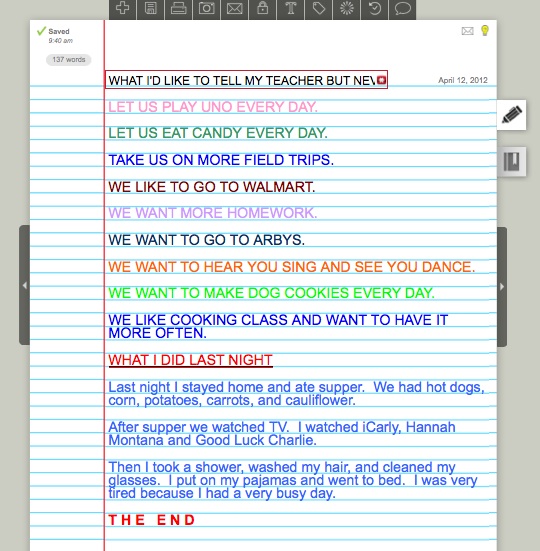
Example of what the Penzu page looks like.
To introduce the class to Voice Threads, I created another Screenflow training video and showed it on the whiteboard. This method of presentation cut down on some of the learning curve time for my students and para-educators.
http://voicethread.com/book.swf?b=2759806
This video clip gives a glimpse into how my students used the program Voice Threads in class.
Here is a video of how the game would go as presented to the Game Strategies and Motivations class:
Here is how the game turned out in class:
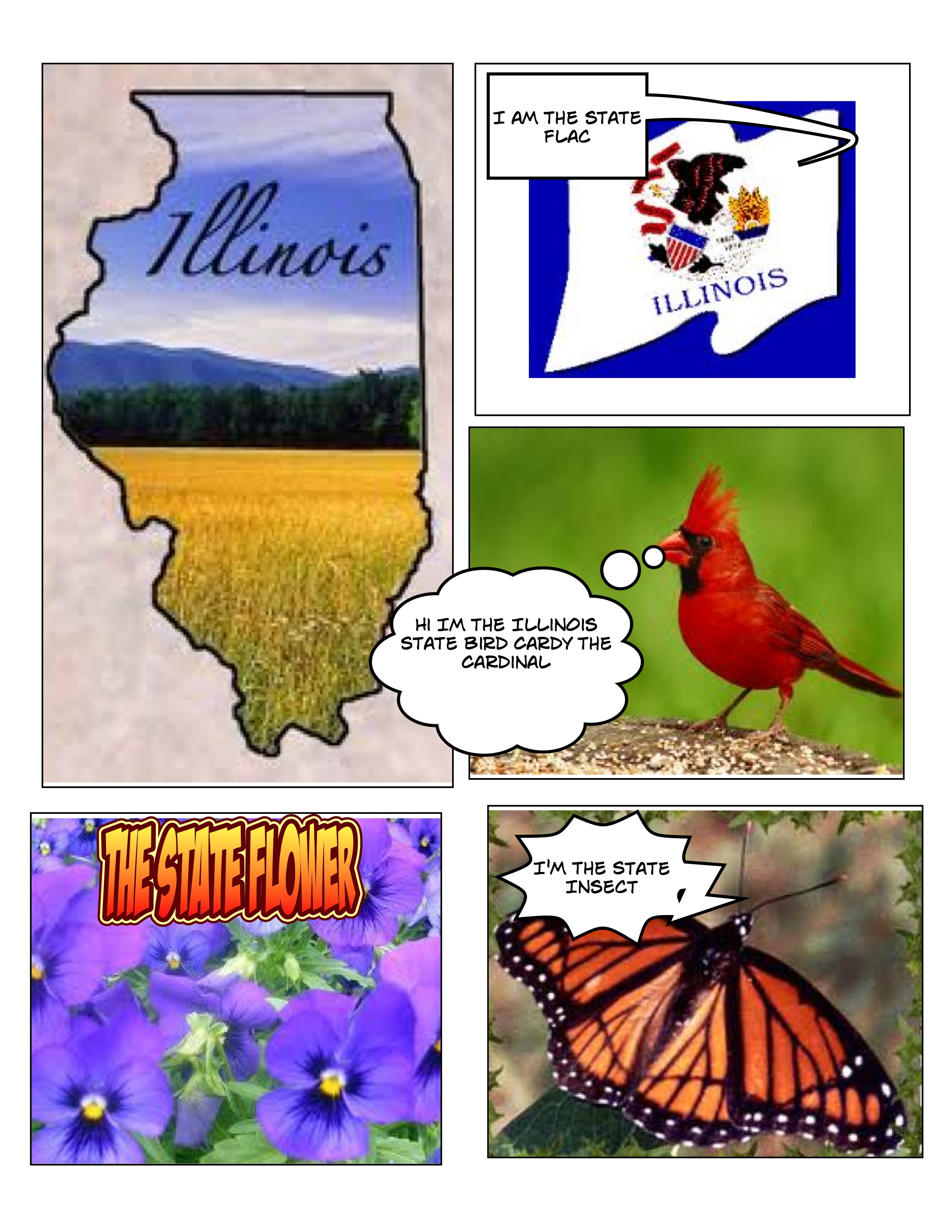
Comic Life used for state facts
 David Mouri
Comments are closed.